
How we automate hotel guest messaging with n8n + AI
A sample walkthrough of how PawBytes connects guest channels, n8n and a Dify AI assistant so hotel teams answer routine questions faster while staff stay in control.
This is a sample post. It was written to test the design of the PawBytes blog. The workflow below is a generic example, not a case study, and any numbers are illustrative.
Hotel front-office teams answer the same questions every day: check-in times, airport transfers, parking, breakfast hours, late checkout. The questions arrive over WhatsApp, email and OTA inboxes, often at night when the desk is busiest. Most of them have a correct answer that already exists somewhere in the hotel's own documents.
At PawBytes we build automations for hotels, travel companies and marketing agencies in Jakarta and beyond. This is how we usually approach guest messaging with n8n for the plumbing and Dify for the AI part.
The goal: faster answers, not fewer people
The aim is not to replace the front desk. It is to take the repetitive drafting off their plate so they can spend time on guests who need a person. We set three rules before building anything:
- Every AI reply is grounded in the hotel's own information, never guessed.
- Anything about money, complaints or special requests goes to a human.
- Staff can see, edit and approve replies before they are sent, at least at the start.
Automation should make the front desk feel calmer, not make guests feel like they are talking to a wall.
How the flow works
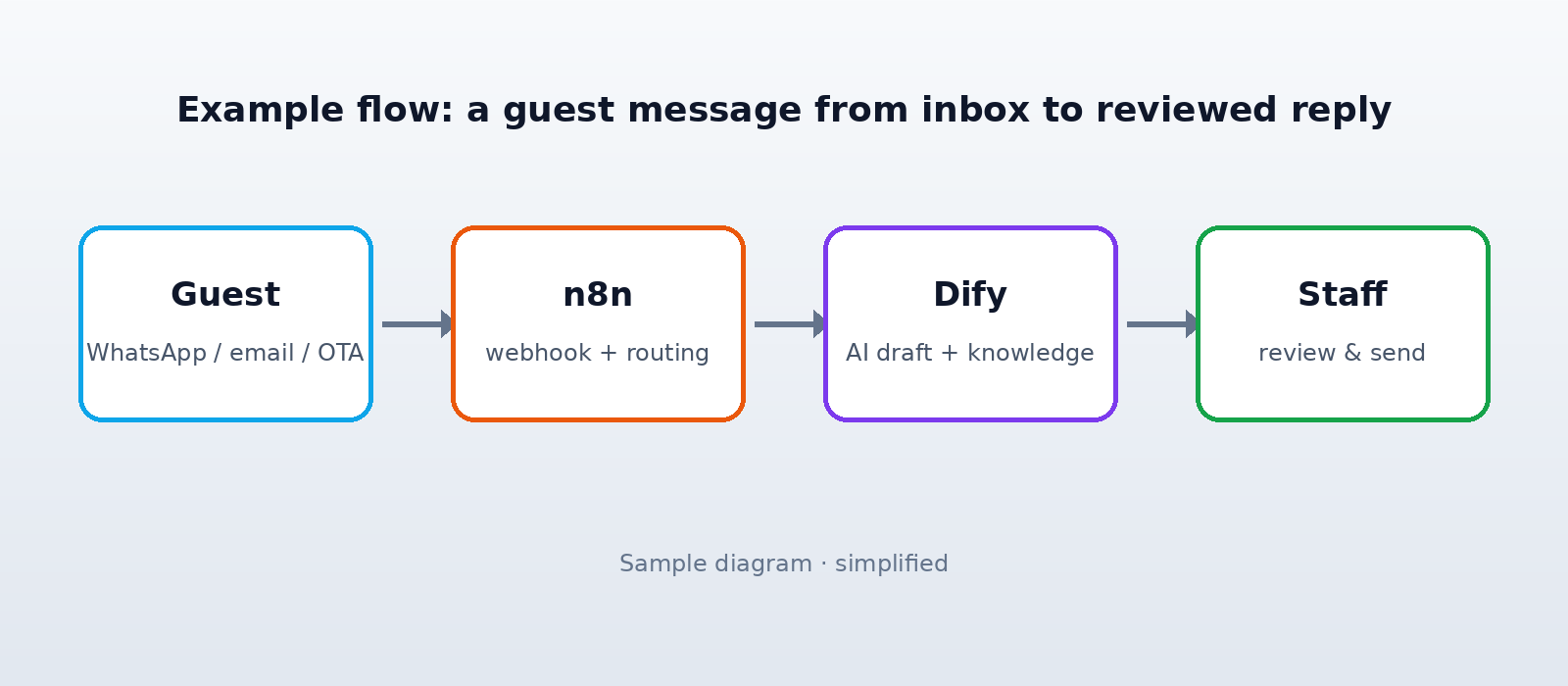
The flow has four steps, and each one is a separate node group in n8n so it can be monitored and changed on its own.
- Capture. A webhook receives the message from the messaging channel and normalises it: guest name, channel, language and booking reference if there is one.
- Classify. n8n sends the text to a Dify app that labels the intent (for example
check_in_time,transfer,complaint) and detects the language, usually English or Indonesian. - Draft. For routine intents, Dify answers from a knowledge base built from the hotel's fact sheet, policies and FAQ. The reply comes back with the sources it used.
- Review and send. The draft lands in the team's inbox or a Slack channel with approve and edit buttons. Sensitive intents skip the draft and go straight to a person.
A look at the routing step
The routing logic is deliberately boring. Here is a simplified version of the n8n Code node that decides where a message goes:
// n8n Code node: route by intent (example only)
const humanOnly = ["complaint", "refund", "payment", "special_request"];
const { intent, confidence, language } = $json;

if (humanOnly.includes(intent) || confidence < 0.7) {
  return [{ json: { ...$json, route: "staff_queue" } }];
}
return [{ json: { ...$json, route: "ai_draft", replyLanguage: language } }];
Keeping this rule in plain code means the hotel team can read it, and changing a threshold does not require retraining anything.
What we watch after launch
Once a flow is live we review it with the hotel team for the first few weeks. The useful signals are simple:
- How often staff edit an AI draft before sending it, and what they change.
- Which questions the knowledge base could not answer, so the fact sheet can be updated.
- Response time outside office hours compared with before (measured per hotel, not promised up front).
When edits become rare for a given intent, the team can choose to auto-send that intent. That decision stays with the hotel.
Things that tend to go wrong
The common problems are not about the AI model. They are about data and ownership: an outdated fact sheet, a breakfast time that changed last month, or nobody being responsible for the review queue at 2 a.m. We plan for those before writing the first node.
Want to try something similar?
If your team handles guest messages in English and Bahasa Indonesia and wants a calmer inbox, we are happy to walk through what a first version could look like for your property. Again, this article is a sample used to test the blog layout.